

Podłączanie polskich płatności do sklepu internetowego jest kluczowym krokiem dla sukcesu e-commerce w Polsce. Dzięki integracji polskich systemów płatności z platformą Shopify możesz zapewnić swoim klientom wygodne i bezpieczne metody płatności, co zwiększa zaufanie i konwersję. Jeszcze kilka lat temu w Polsce były dostępne zachodnie systemy płatności, jak np. 2Checkout. Ich proces integracji był skomplikowany, same płatności pobierały wysokie prowizje, a proces KYC mógł trwać nawet kilka tygodni. W tym artykule omówimy różne systemy płatności dostępne dla sklepów Shopify w Polsce, aby pomóc Ci dokonać właściwego wyboru.
Wybór polskiego systemu płatności Shopify 2025
W Polsce istnieje wiele polskich systemów płatności, które oferują różnorodne funkcje i integracje z Shopify. Przykładowo Przelewy24, PayU, Dotpay i Blue Media. Dzisiaj skupimy się na Przelewy24, przeanalizujemy ich cechy, funkcje, integrację z Shopify oraz opłaty transakcyjne, zabezpieczenia i obsługę klienta.

Operator płatności Przelewy24 – jak dodać tę metodę płatności?
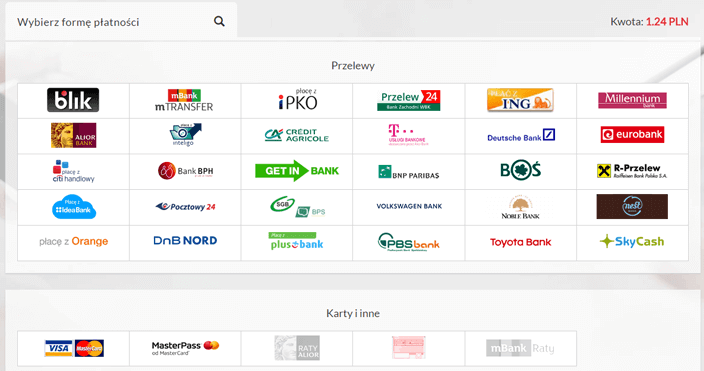
Przelewy24 jest jednym z najpopularniejszych polskich systemów płatności. Integruje się bezproblemowo ze sklepami online na platformie Shopify, umożliwiając klientom dokonywanie płatności kartą kredytową, przelewem bankowym, BLIK-iem i portfelami elektronicznymi. System ten oferuje również zaawansowane funkcje, takie jak podzielone płatności, automatyczne rozliczenia i rozbudowane raportowanie transakcji. Przelewy24 znane są z solidnych zabezpieczeń i oferują doskonałą obsługę klienta.
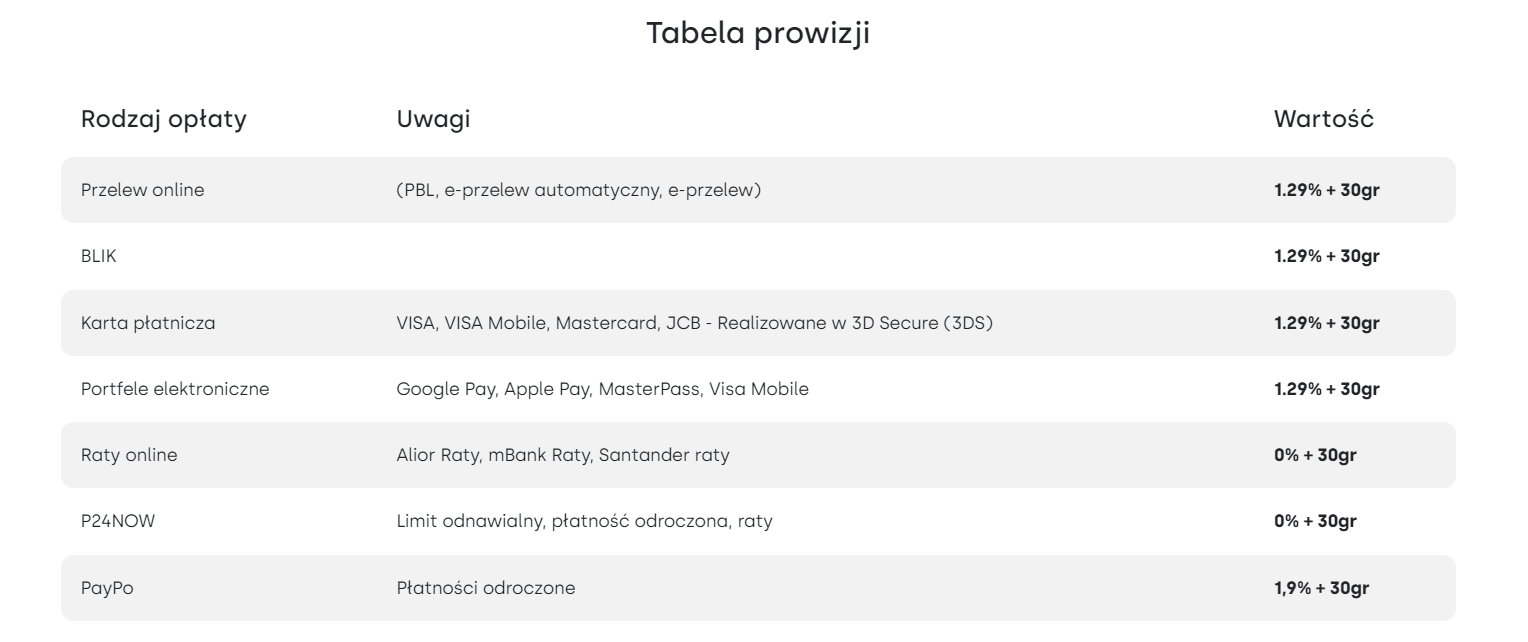
Zwróć uwagę na prowizje pobierane za transakcję w systemie Przelewy24.
Wszystko fajnie, jednak zapytasz się, jak je podłączyć pod sklep. Przecież po to jesteś na naszym blogu. W linku obok znajdziesz całą dokumentację techniczną, wzory umów i regulaminy Przelewy24 https://www.przelewy24.pl/do-pobrania. Świetnie, jeśli się zapoznasz z materiałem i porównasz sobie z ofertą innych dostawców płatności. W kolejnym linku znajdziesz instrukcję poruszania się po panelu Przelewy24.
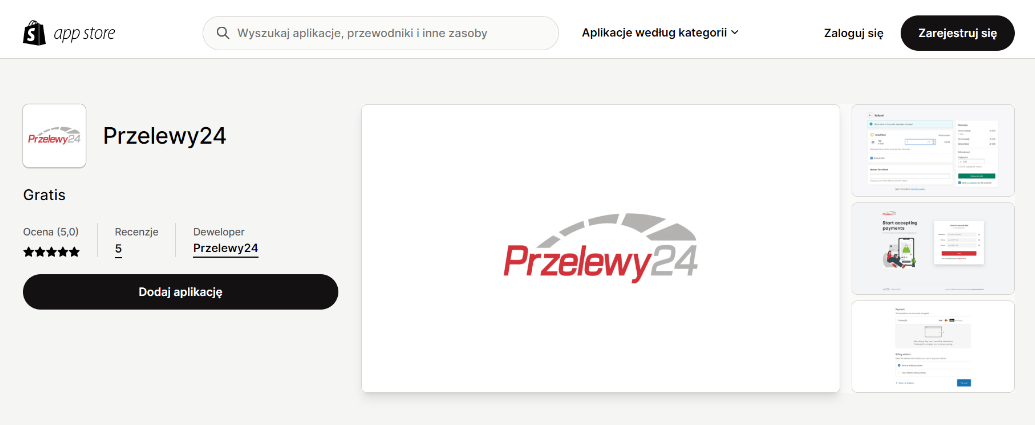
Pierwsze, co trzeba zrobić, to dodać wtyczkę Przelewy24 do swojego sklepu, możesz to zrobić przez ten link, dzięki niej będzie można przyjmować płatności i generować zwroty.
Możliwości modułu płatności Przelewy24 w systemie Shopify Payments
- Konfiguracja środowiska Sandbox / Produkcja w Przelewy24,
- Zwroty całościowe, zwroty częściowe wraz z notyfikacjami zwrotów,
- Wyświetlenie bramki płatności z przekierowaniem płatnika do Przelewy24,
- Obsługa walut – każdą walutę można ustawić per sklep, tj. store – tak działają waluty w Shopify.
Kolejny etap to kontakt z przedstawicielem Przelewy24 w celu podpisania umowy i weryfikacji swojego konta. Dzięki temu otrzymasz od Przelewy24 informacje niezbędne do połączenia wtyczki i płatności ze sklepem, czyli kod Merchant ID, CRC i API key.
Integracja Przelewy24 ze sklepem Shopify – identyfikator sprzedawcy, klucz CRC, API i konfiguracja płatności
Uzyskanie identyfikatora sprzedawcy
Sprzedawca musi zalogować się do panelu transakcyjnego Przelewy24 i znaleźć identyfikator sprzedawcy, który jest numerycznym loginem przypisanym do konta. Ten identyfikator będzie potrzebny do integracji Przelewy24 z Shopify.
Pozyskanie klucza CRC i klucza API
Po zalogowaniu się do panelu transakcyjnego Przelewy24 sprzedawca musi przejść do zakładki „Moje Dane”. Tam będą dostępne klucz CRC oraz klucz API, które są niezbędne do prawidłowego działania integracji z Shopify. Klucz CRC jest używany do generowania i weryfikacji podpisów transakcji, podczas gdy klucz API służy do autoryzacji komunikacji między sklepem Shopify a Przelewy24.
Aktywacja i konfiguracja metody płatności w Shopify
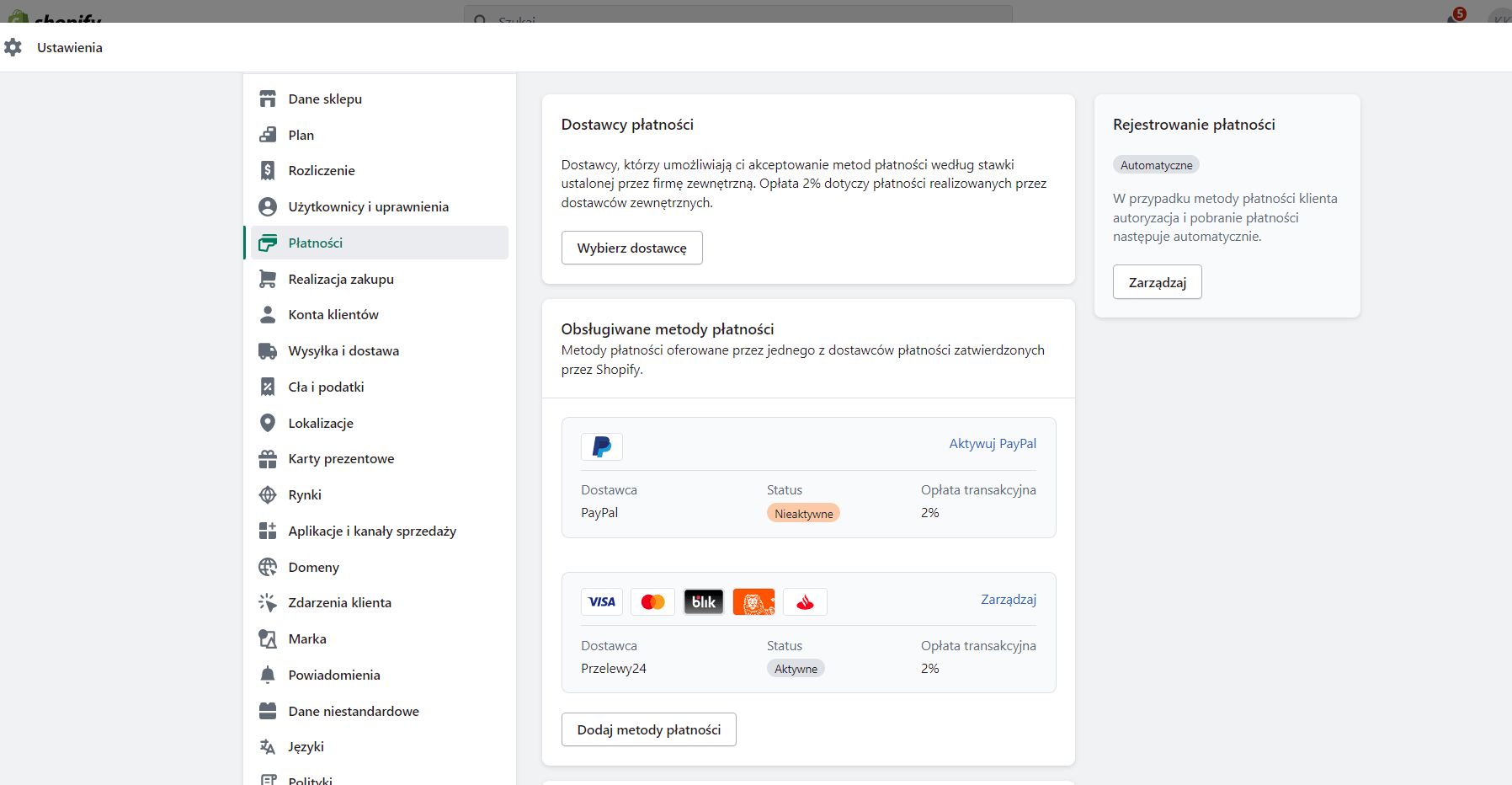
Po uzyskaniu wszystkich niezbędnych informacji sprzedawca powinien zalogować się do panelu administracyjnego Shopify. Następnie należy przejść do sekcji „Ustawienia” i wybrać „Płatności”. W tym miejscu sprzedawca będzie mógł aktywować Przelewy24 jako metodę płatności i wprowadzić wszystkie wymagane dane, takie jak identyfikator sprzedawcy, klucz CRC i klucz API. Po zapisaniu ustawień metoda płatności Przelewy24 będzie gotowa do użycia w sklepie.
Pamiętaj również, aby wstawić swój statyczny numer IP Twojego sklepu, jest taki sam dla całego Shopify: 23.227.38.65
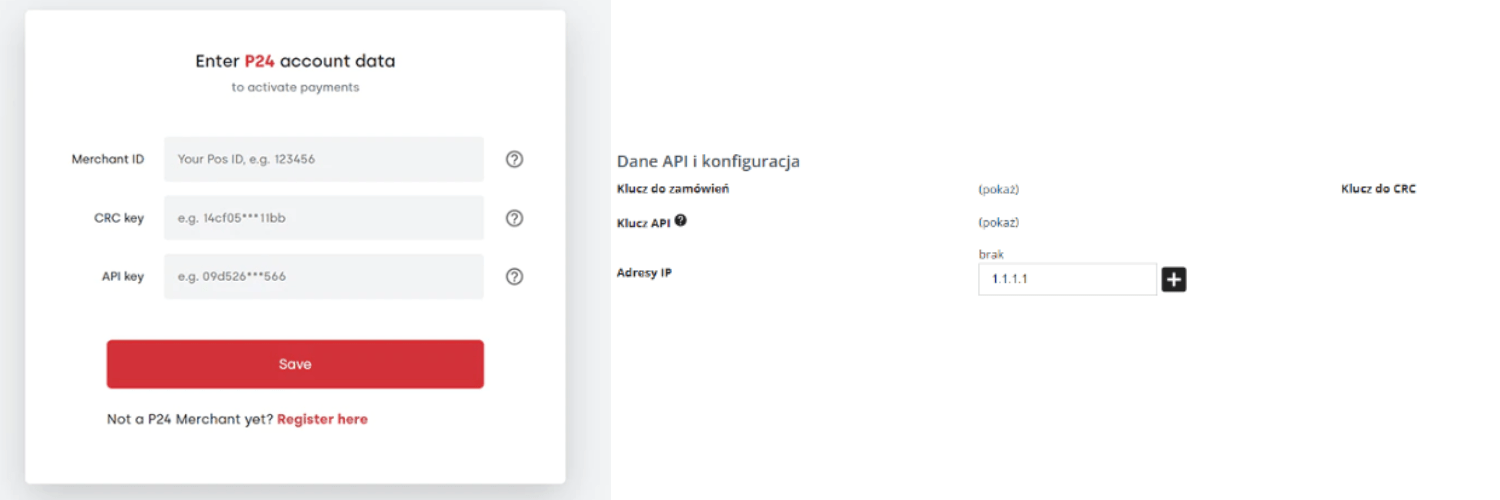
Posiadając zainstalowaną aplikację w swoim sklepie i podpisaną umowę z Przelewy24, możesz skonfigurować aplikację. Z panelu Shopify wejdź w Ustawienia => Płatności => Dodaj metody płatności. Znajdziesz tam naszą aplikację, w niej będziesz mógł wpisać Merchant ID i klucze API pozyskane wcześniej. Cały okres integracji trwa 2–3 tygodnie, dużą część czasu zajmuje weryfikacja konta.
Czy każda inna polska bramka działa z Shopify?
Na papierze – tak. W rzeczywistości tylko część z nich oferuje pełną, stabilną integrację z Shopify. Niektóre mają oficjalne aplikacje, inne wymagają ręcznego podpięcia przez API. Bywa, że czegoś brakuje – obsługi zwrotów, notyfikacji o płatności, wsparcia dla innych walut.
Zdarza się, że wszystko działa do momentu aktualizacji. Potem integracja się sypie, a sklep przestaje przyjmować płatności. I trudno powiedzieć, kto powinien to naprawić – właściciel, operator, a może ktoś trzeci. W takich sytuacjach brak przygotowania kosztuje najwięcej.
Potrzebujesz wdrożyć polskie płatności Shopify?
Jeśli nie chcesz się zagłębiać w cały proces lub nie masz czasu, skontaktuj się z nami. Połączyliśmy już dziesiątki sklepów, a polskie formy płatności dla polskiego klienta mają ogromne znaczenie!